The Shopify stack
What is the best inventory management software for Shopify?
There is no single best tool, because Shopify merchants are solving five different problems and calling them all inventory management. Keeping stock accurate across channels, running fulfilment, forecasting demand, planning the buy, and running the books are separate jobs, and the tool that is right for one is usually wrong for the others.
This guide covers what Shopify already does natively, where it stops, the five categories of tool merchants add on top, and how to work out which one you actually need.
7 min read · Updated 28 July 2026
The short answer
The right tool depends on the problem.
The best inventory management software for Shopify is the one that matches the problem you actually have. If stock counts disagree across channels, you need a sync tool. If picking and shipping is the bottleneck, you need an ops or fulfilment tool. If you are guessing at reorder quantities, you need forecasting and replenishment. If you are committing budget to a buy months ahead of a season, you need merchandise planning. If finance is the constraint, you need an ERP.
Most merchants buy the wrong one first, because every category describes itself as inventory management. The fastest way to choose is to name the decision you keep getting wrong, then buy the tool that makes that decision, rather than the tool with the longest feature list.
The baseline
Shopify does more natively than you think.
Plenty of merchants buy software before they have used what they already pay for. Shopify's built-in inventory tools go further than most people assume.
Shopify tracks stock per product and per variant, and it tracks it across multiple locations, so warehouses, retail stores and third party fulfilment centres can each hold and fulfil their own stock. It flags low and out of stock lines. It handles transfers between locations. It carries a set of inventory reports covering things like average units sold per day, sell-through rate, ABC analysis and inventory snapshots. It supports purchase orders for receiving stock, entered manually.
For an early stage store with a manageable SKU count and one or two locations, that is a complete system. The reports tell you what happened, the counts are accurate enough, and the manual work is small enough to absorb. Adding a planning platform at that stage is buying a problem you do not have yet.
Where it breaks
The native tools record, they do not decide.
The native tools are built to record stock accurately. They are not built to decide anything. The limits show up in a fairly predictable order as a business grows.
- It reports the past, it does not forecast the future.
- Shopify shows you historical sales. It does not project forward demand, account for seasonality, or read a trend shift. Every forward number you work with is one you built yourself.
- Reorder points are static.
- There is no dynamic reorder calculation. You can set a fixed threshold and get an alert when stock falls below it, but the threshold does not move when sales velocity or supplier lead times move, so a number that was right in March is quietly wrong by June.
- Purchase orders are manual.
- POs are built by hand rather than generated from projected demand and lead times. The workload scales directly with your SKU count.
- Bundles do not deduct components.
- A bundle is treated as its own SKU with its own count, so selling one does not reduce the stock of what is inside it. Availability drifts away from reality, and you find out when you cannot fulfil.
- Separate stores do not share stock.
- Each Shopify store holds its own inventory, and stock is not shared between them. Multi-region and multi-brand operators reconcile that gap somewhere else.
- Marketplace sync lags.
- Pushing listings and pulling orders from Amazon, eBay or Walmart works, but stock updates lag, and the gap between a sale on one channel and the adjustment landing on another is where oversells happen.
- There is no financial plan.
- Nothing in Shopify holds a seasonal budget, an open-to-buy position, or a weekly view of sales, stock and intake. The buy gets planned in a spreadsheet, and that spreadsheet stops agreeing with the store almost immediately.
The options
Five categories, five different problems.
Almost every product marketed as Shopify inventory software falls into one of five categories. They solve different problems, and the reason merchants end up with three of them is usually that they bought on category name rather than on the job it does.
| Type of tool | What it actually solves | When you need it | What it does not do |
|---|---|---|---|
| Shopify native | Accurate counts, per variant, across locations | From day one, and for longer than most people think | Forecast, plan a buy, or hold a budget |
| Inventory sync | One stock number across Shopify, marketplaces and other storefronts | When you sell the same SKU in more than one place and counts disagree | Tell you how much to buy or when |
| Ops and fulfilment | Picking, packing, shipping, returns, 3PL and warehouse workflow | When fulfilment volume, not stock accuracy, is the bottleneck | Touch the commercial decision at all |
| Forecasting and replenishment | Projected demand, dynamic reorder points, generated purchase orders | When you are reordering on instinct and getting it wrong in both directions | Hold a seasonal budget or plan a range |
| Merchandise planning | Seasonal budget, open-to-buy, weekly sales stock and intake, range and allocation | When you commit money to a buy months before the season trades | Pick, pack or ship anything |
| ERP | Finance, accounting, landed cost, the books | When finance needs one system of record across entities | Merchandise planning, in most cases |
Two of these are not really alternatives to each other. A sync tool and a planning platform solve problems at opposite ends of the same business, and merchants at scale usually run both.
How to choose
Your stage picks the tool.
- If you run one store, under a few hundred SKUs, one or two locations.
- Use what Shopify gives you. Add a forecasting app only when reorder decisions start costing you real money. Anything more is premature.
- If you sell the same SKU across Shopify, marketplaces and retail.
- Sync first. Every other decision you make is built on stock numbers, and if those numbers are wrong, better forecasting just gives you confident wrong answers faster.
- If fulfilment is the constraint.
- Ops and 3PL tooling. This is a genuinely separate problem from anything on the rest of this list, and buying a planning platform will not touch it.
- If you are reordering continuity lines without a forecast.
- Forecasting and replenishment. You want dynamic reorder points that move with velocity and lead time, and purchase orders that come out of projected demand rather than out of a spreadsheet.
- If you buy a season ahead.
- Merchandise planning. Once you are committing budget months before the stock trades, the constraint is not counting stock, it is deciding how much to commit and to what. That needs a MFP (WSSI) and an open-to-buy position, and it is the point at which most growing brands discover their planning spreadsheet has quietly stopped being trustworthy.
- If finance is the constraint.
- ERP. Then add planning on top, because most ERPs do merchandise planning badly or not at all.
In merchmix
merchmix sits in merchandise planning.
merchmix is in the merchandise planning category, and it is worth being clear about what that means.
- What it is not.
- It is not a fulfilment tool, a 3PL system or a shipping app. It is not a listing sync tool for marketplaces. And it is not the right call for a store running a few hundred SKUs out of one location, where Shopify plus a forecasting app will serve you better and cost you less.
- What it is.
- merchmix connects to Shopify and Shopify Plus and layers the planning and trading workflows Shopify does not have. Budget and open-to-buy, weekly sales stock and intake, range and assortment planning in core; allocation and replenishment and the planogram in core plus; supplier collaboration in forge. All of it reads live sales and stock from the store rather than from a pasted export.
It supports multiple Shopify stores as separate connected instances rather than one merged pool, which matters for multi-region and multi-brand operators, and it can map order destination into planning markets so a region is planned as a region rather than as a shipping address. It reads alongside your ERP rather than replacing it, so your system of record stays where it is with approval-first publish-back.
The line is simple. Shopify runs the store. merchmix plans what goes into it and decides what happens next. Your team still makes every call, and the platform makes sure the call reaches the place it needs to reach while it still counts.
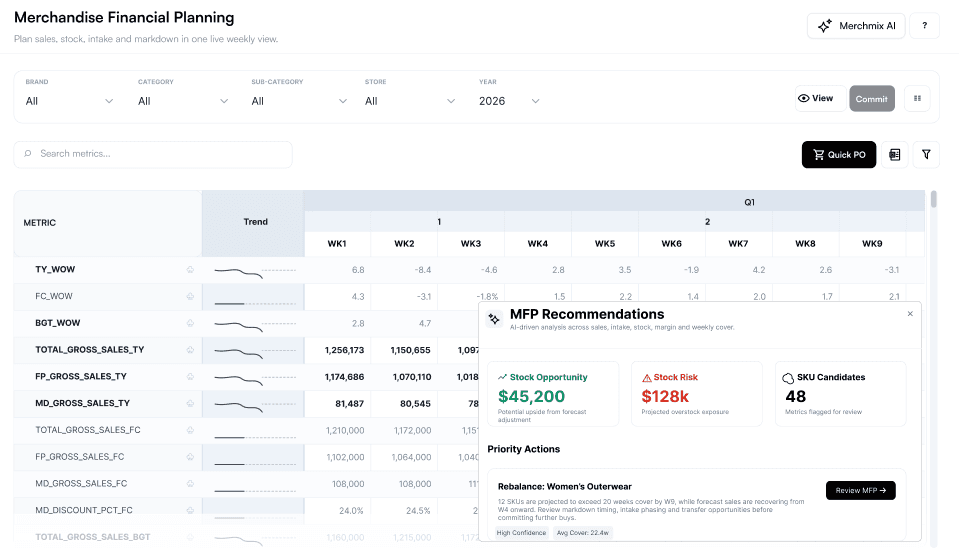
Planning on top of your Shopify stack.
1-hour demo with sales and product.
Questions, answered.
Does Shopify have built-in inventory management?
Yes. Shopify tracks stock per product and variant across multiple locations, flags low and out of stock lines, supports transfers between locations, offers inventory reports including sell-through and ABC analysis, and supports manually entered purchase orders. It is a complete system for a small or early stage store. It does not forecast demand, calculate dynamic reorder points, or hold a seasonal budget.
What is the best inventory management software for Shopify?
There is no single best tool, because merchants are solving five different problems. Sync tools keep counts consistent across channels. Ops tools run fulfilment. Forecasting tools decide reorder quantities. Merchandise planning platforms hold the seasonal budget and open-to-buy. ERPs run finance. Identify which decision you keep getting wrong, then buy the tool that makes that decision.
Why does my Shopify stock not match my other channels?
Marketplace and multichannel sync is not immediate. There is a lag between a sale registering on one channel and the stock adjustment landing on another, and oversells happen in that gap. Separate Shopify stores also hold entirely separate inventory and do not share stock with each other. Both are sync problems rather than planning problems, and they are solved by a sync tool.
Can Shopify forecast demand?
Not natively. Shopify reports on historical sales, including units sold per day and sell-through rate, but it does not project forward demand, model seasonality or detect a trend shift. Forward-looking numbers come from a forecasting app, a planning platform, or a spreadsheet you maintain yourself.
Does Shopify handle open-to-buy or WSSI?
No. Shopify has no concept of a seasonal budget, an open-to-buy position, or a weekly sales, stock and intake plan. Merchants who buy a season ahead run these in a spreadsheet or in a dedicated merchandise planning platform.
Do I need an ERP if I use Shopify?
Only when finance needs a single system of record, typically across multiple entities, currencies or landed cost structures. An ERP is not a substitute for merchandise planning, and most handle it poorly or not at all, so the two usually sit alongside each other rather than one replacing the other.
Does merchmix work with Shopify?
Yes. merchmix connects to Shopify and Shopify Plus, supports multiple stores as separate connected instances, and reads live sales and stock into planning. It sits on top of Shopify rather than replacing it. See what merchmix connects to for the wider list.
When should a Shopify brand move off spreadsheets for planning?
When the buy is committed far enough ahead that a wrong number cannot be corrected in season, and when more than one person needs to work from the same plan. The failure mode is not that spreadsheets are bad at maths, it is that there is no single agreed version and a broken formula in one week silently rewrites the rest of the season.
Shopify runs the store, merchmix plans it.
Let us show you how merchmix sits on top of your Shopify stack and turns live sales into decisions your team can act on. Free 6-week POC on your own data, no contract.